The Ultimate Guide to Best AI Tools for Business Automation in 2026
The days of treating AI like a shiny new toy are over. By 2026, the competitive landscape has shifted. It’s no longer about playing with chatbots; it’s about "agentic operations." We’re talking about autonomous engines that don’t just spit out answers—they execute complex, multi-step workflows without you hovering over their shoulder.
According to the SBE Council Small Business Tech Survey, over 80% of businesses have already baked AI into their core operations. If you’re still using AI as a glorified autocomplete tool, you aren’t just lagging behind—you’re actively bleeding efficiency. True automation today is about "self-driving" business processes. It’s about letting AI handle the drudgery so you can finally get back to actual strategy.
Chatbots vs. AI Agents: Know the Difference
Most people still think a chatbot and an AI agent are the same thing. They aren't. A chatbot is a mirror; it just reflects the data you feed it. It waits for a command and spits out a response.
An AI agent, on the other hand, is a worker. It has a goal, it has access to a toolbox, and it has the reasoning power to navigate obstacles between "start" and "done."

Think of the difference this way: A chatbot is like asking someone to write an email. An AI agent is like hiring a digital assistant who monitors your CRM, spots a cold lead, drafts a personalized sequence, schedules the follow-up, and updates your pipeline—all before you’ve even finished your first cup of coffee.
Building Your 2026 Tech Stack
Building an effective stack isn't about buying every trendy subscription. It’s about viewing your business as a series of pipes. If you need bespoke orchestration that actually fits your infrastructure, you should explore Custom AI Automation Solutions. They bridge the gap between off-the-shelf software and the messy reality of your specific business needs.
Operations and Workflow
In 2026, your biggest enemy is "integration debt"—the tax you pay for maintaining manual workarounds between apps that refuse to talk to each other. You need platforms that act as a central nervous system. When you need to scale output without ballooning your headcount, using an AI Content Strategy Blog as your framework ensures your automated content engines are driving actual revenue, not just filling space.
Marketing and Sales
Stop doing manual data entry. Your marketing stack should be built on predictive analytics and automated nurturing. Deploy agents that monitor sentiment across your channels, categorize leads based on real intent, and trigger outreach sequences automatically. If a human is manually moving data from an email into a spreadsheet, you’ve already failed.
Finance and HR
Back-office tasks like invoice reconciliation, payroll forecasting, and onboarding are perfect candidates for automation. By using AI for document generation, you can drive your human error rate down to near zero. This frees up your finance team to actually analyze capital allocation instead of hunting for missing data points.
The 30/60/90-Day Implementation Roadmap
Don’t treat this like an IT project. This is a total re-engineering of how your business breathes. Use this framework to transition your team without losing your mind.
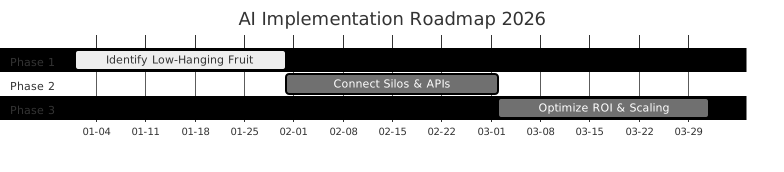
Phase 1 (Days 0-30): The Low-Hanging Fruit
Don't try to automate everything at once. Use the "Rule of Three": Find the three most repetitive, high-volume tasks that burn your team’s time. If a process requires a human to "think"—to be creative or nuanced—leave it alone. If it requires a human to "copy-paste," build an agent for it.
Phase 2 (Days 31-60): Connecting the Silos
Now, bridge the gaps. Look at resources like Zapier's Guide to AI Productivity to learn how to hook your CRM, email, and project management tools together. The goal? If action A happens in your CRM, reaction B should trigger in your email automatically. No human intervention.
Phase 3 (Days 61-90): Scaling the Agentic Workflow
Once the pipes are connected, shift into optimization mode. Watch for "drift"—where the AI starts getting lazy or confused. Refine your "Human-in-the-Loop" checkpoints here. You want to maintain oversight on high-stakes decisions while letting your agents handle the heavy lifting of high-volume execution.
Measuring ROI: Beyond the Spreadsheet
The biggest trap? Measuring AI success by "software costs saved." That’s a rounding error. True ROI is measured in "hours reclaimed." How much time did you give back to your high-value employees? Use G2 Emerging AI Software to benchmark your tools against industry standards.
Calculate the cost of the manual process (hourly salary x time spent) and subtract the cost of your AI tools and maintenance. If the result is positive, you’ve got a winner. If it’s negative, you’ve over-engineered a simple problem. Keep it simple.
The Danger Zone: Risks to Watch For
The biggest risk isn't that AI will "take over." It’s that you’ll trust it too much.
"Integration debt" is real. If you daisy-chain ten different AI tools without proper documentation, you’re building a house of cards. One update to an API and the whole thing comes crashing down.
Then there’s the "hallucination" problem. AI can sound incredibly confident while being completely wrong. In finance or legal work, that’s a disaster. Think of your AI agents as brilliant, tireless interns who occasionally need a sanity check from a senior manager. Never let them sign a contract or approve a payment without a human signature. Period.
Frequently Asked Questions
How do I know if a process is ready for AI automation?
Look for high-volume, rule-based, repetitive tasks. If you can explain it to a new hire using a clear "if-this-then-that" checklist, it’s ready for an agent. If it requires empathy, deep negotiation, or strategic intuition, keep it human.
Will AI automation replace my employees?
AI is about augmentation, not replacement. By offloading the operational drudgery to agents, you empower your employees to move from "executors" to "architects." Your team spends less time doing the grunt work and more time designing the systems that do the work. It’s a more valuable, sustainable career path.
What is the biggest risk when implementing AI tools in 2026?
The biggest risk is over-reliance on unverified outputs. Because AI sounds so smart, it’s easy to skip the review process. Always implement a "verification layer"—a human who audits the agent’s output, especially during the first few months of any new workflow.
How long does it take to see ROI from AI automation?
You should see "quick wins" in operational efficiency within the first 30 days—usually in time saved on data entry or email management. Systemic ROI, where you actually see a shift in your bottom line, typically shows up between the 60 and 90-day mark as your workflows stabilize and your team gets comfortable managing the agentic stack.