Introducing Query Categories in Search Console Insights

Introduction
Google just made analyzing keywords a lot less painful.
With the launch of “Query Groups” in Search Console Insights, you can finally see search terms organized by intent, not just exact phrasing.
For creators, marketers, and SEO tool builders — this is a game-changer.
What Exactly Are Query Groups?
When you look at your site’s search data, you’ve probably noticed endless versions of the same thing:
“robots.txt,” “robot txt,” “robots.txt example,” “what is robots.txt,” etc.
Now, Google automatically groups these similar queries under a single Query Group — giving you a clear, AI-powered snapshot of user intent.
Why It’s a Big Deal
Here’s why every SEO and tool builder should care:
🚀 Faster insights: No more endless scrolling through repetitive keywords.
🧠 Smarter decisions: You can spot the topic families your audience cares about.
📈 Better content planning: Build one strong page that covers multiple related queries.
📊 Simplified reporting: Ideal for SEO dashboards and client reports.
Inside the New Insights Card
The Queries leading to your site card now show three types of data:
Top: Most-clicked query groups
Trending up: Fastest-growing groups
Trending down: Groups losing traction
Each group displays related queries and total clicks — and you can click through for detailed performance data.
Example View
Here’s an example of what it looks like 👇
Notice how “schema checker” combines related phrases like “schema validator,” “schema markup checker,” and “schema tester.”
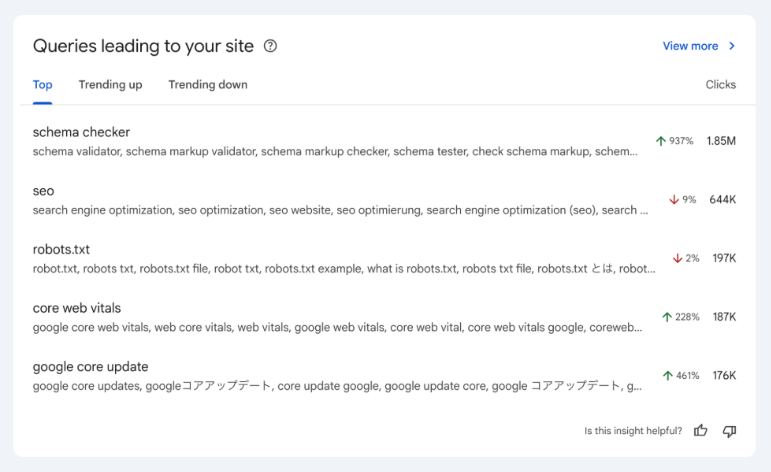
This helps you instantly identify which topics perform best without manually merging keywords.
How SEO Tools Can Leverage This
If you build or use SEO tools, this update opens new possibilities:
Automated clustering: Integrate query group logic into rank-tracking or keyword clustering systems.
Intent segmentation: Use Google’s AI groups to improve how you segment user intent.
Performance insights: Combine Query Groups with Core Web Vitals or CTR data for deeper analysis.
Client storytelling: Use grouped data to show clear progress in content themes, not just keywords.
Wrapping Up
Google’s “Query Groups” in Search Console Insights make SEO more human-friendly — and that’s a win for everyone.
It’s easier to see what people truly care about, not just how they type it.
If you haven’t explored it yet, open your Search Console Insights and check the new “Queries leading to your site” card — you’ll probably see some surprising patterns.
📖 Official Source: Google Search Central Blog