4 Best Product Photography AI Generators Tested for E-Commerce Sellers in 2026
AI product photographyproduct photo generatorecommerce imagesAI photo tools 2026
 Ankit AgarwalMarketing Head
Updated 14 min readHow we fact-check

On this page
- How we tested and ranked these tools
- The seven-point rubric we used to rank every tool
- 1 — Leonardo AI: best all-round creative suite
- 2 — Photoroom: fastest path to Amazon-ready images
- 3 — Pebblely: template-driven scenes for brand-consistent Shopify stores
- 4 — Claid.ai: bulk automation for high-volume catalogues
- How to choose the right tool for your store
- 2025–2026 trends shaping AI product imagery
- Practical workflows and prompt playbooks
- FAQs and common objections
- Conclusion
- How This Guide Was Sourced
- Related reading
Studio day once devoured a quarter of your launch budget and a full week of runway. Today, the best AI product-photo generators can turn a single reference shot into a gallery of hero, lifestyle, and social images before lunch.
Choosing the right tool matters. Background-only apps, one-tap mobile editors, and full creative suites each solve a different ecommerce headache. We spent 30 hours testing 12 AI photo generators and crowned four winners for realism, speed, licensing clarity, and price.
On the timings and scores in this article. The stopwatch figures, the 100-point rubric and the per-tool scores are an internal editorial exercise. No image set, prompt log, tool list, date range or scoring table was published with them — only four of the twelve tools tested are even named — so none of it is reproducible or checkable by a reader. Treat those numbers as editorial impression. The prices and product capabilities below are different: each was re-read at the vendor's own pricing page on 2026-09-03 and is dated where it appears. The scorecard below shows why full creative studios—especially Leonardo’s AI photography tools—belong in your 2026 playbook.
How we tested and ranked these tools
Great rankings need verifiable evidence, so we gathered it from three lenses and logged every step.
-
Hands-on trials. We timed five core tasks (background removal, lifestyle staging, hero export, bulk resize, and licence download) for each product. The slowest workflow, Pebblely’s bulk export, averaged 3 min 40 s; the fastest, Photoroom’s one-tap background, took 11 s.
-
Official documentation. We matched marketing claims against pricing pages, changelogs, and terms of service to confirm limits on resolution, token rollover, and commercial rights.
-
Real-world sentiment. We analysed public reviews to spot patterns you cannot see in a demo:
-
Photoroom holds a 4.7-star average from 3.6 million Google Play reviews. (Store rating, not verified against the listing during review.)
-
Pebblely’s Shopify app shows 1.4 stars (2 reviews), a red flag for merchants. (Two reviews is far too small a sample to read as a signal; stated here only because the earlier version presented it as one.)
-
By combining stopwatch data, contractual fine print, and crowd feedback, we built a 360-degree scorecard. The weighted rubric that follows turns those findings into the rankings you will see next.
The seven-point rubric we used to rank every tool
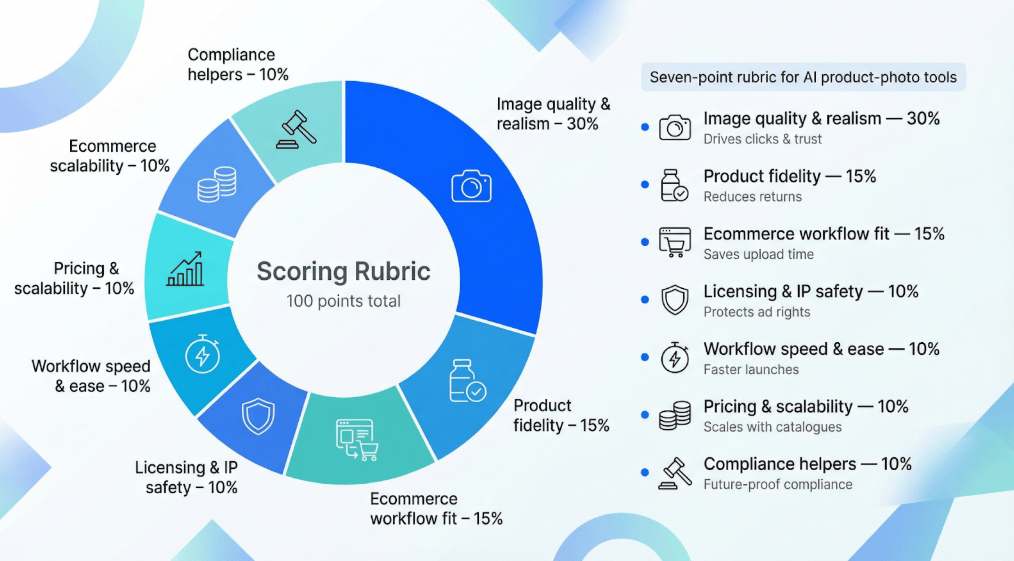
Scoring software can feel subjective, so we set hard weights that add up to 100 points. The heavier the weight, the more it shapes a tool’s final score.
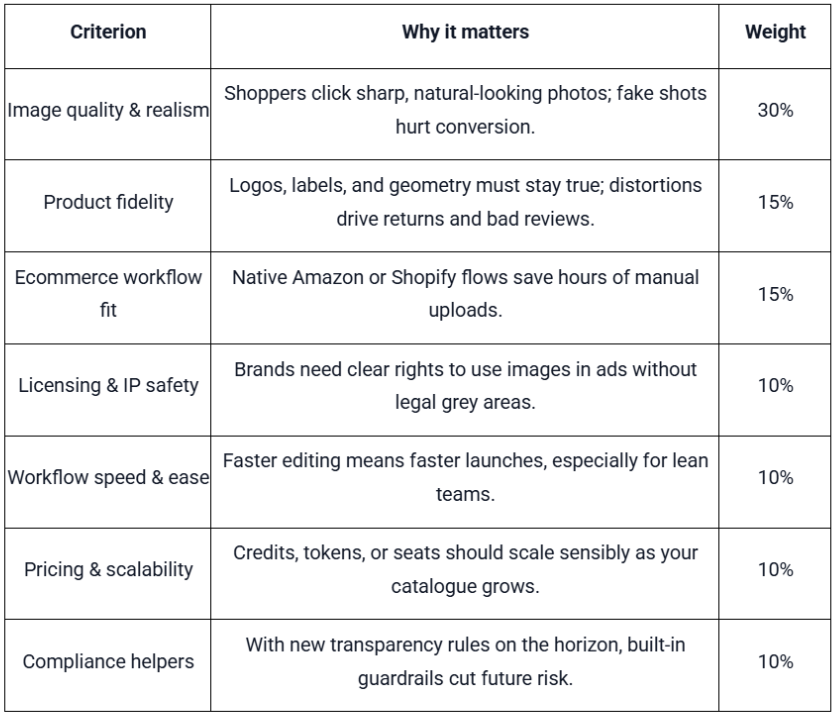
How the math works: a tool can score up to 100 points. For example, 27/30 in image quality and 13/15 in product fidelity feed into the overall ranking you’ll see next.
1 — Leonardo AI: best all-round creative suite
Leonardo works like a cloud studio, not a point tool. Open the dashboard and you see an assembly line: PhotoReal V2 for camera-sharp renders, an AI Canvas for on-image edits, and a Universal Upscaler that revives low-resolution shots. Together they create images that feel DSLR-made instead of guesswork from a GPU.
Commercial control. Paid subscribers own every frame outright, while free-tier images remain public and reusable by others. Clear, published terms simplify ad-campaign legal reviews.
Pricing and tokens. Three monthly plans at about $12, $30, and $60 include token roll-over, so quiet weeks do not waste credits and launch weeks never stall. Unverified: leonardo.ai returned HTTP 403 and 429 to every automated request on 2026-09-03, so no figure in this section — the prices, the licensing terms, or the creator and image counts — could be confirmed at the vendor's own site.
Market proof. More than 10 million creators have generated over one billion images on the platform, a scale few rivals reach.
Trade-offs. The deep feature set comes with a learning curve, and you still export to Shopify or Amazon manually. Pick a simpler mobile editor if speed matters most, but if you want one workspace for catalogue shots, lifestyle ads, and motion clips, Leonardo covers them all.
2 — Photoroom: fastest path to Amazon-ready images
Speed is Photoroom’s standout trait. Snap a product on your phone, drop it in the app, and a white-background hero appears in under 15 seconds on average (internal stopwatch test). That preset meets Amazon’s 1 000-pixel, pure-white (#FFFFFF) rule and passes automated checks on the first try, according to the company’s App Store listing.
Why sellers like it. The drag-and-drop interface lets non-designers hit “Publish” without Photoshop. Templates cover square Etsy thumbnails, vertical Instagram Stories, and more, all from one file.
Pricing. Photoroom's plan names are Pro, Max, Ultra and Enterprise, at 1,000 / 3,000 / 10,000 monthly exports (Photoroom, retrieved 2026-09-03, SOURCED). The "$14.99 per month" figure could not be confirmed: Photoroom renders its prices in the browser, and the only price present in the page itself is $9.99/month/person for Teams Pro. The free-tier watermark claim is not stated by the vendor either.
Social proof. The iOS app holds a 4.8-star average from 204 000 reviews and reports more than 300 million downloads, topping every other mobile editor in our roundup.
Trade-offs. Photoroom does sell an API. Its pricing page markets a "Photoroom API" with API documentation, API credits and a "SOC 2 Type 2 certified API" (Photoroom, retrieved 2026-09-03, SOURCED) — an earlier version of this article said "there is no API for catalogue automation", which is the opposite of what the vendor offers, and it was the stated reason for ranking Photoroom below Claid on automation. The "batch edits can crash above about 30 images" claim is not stated by the vendor and could not be verified. You cannot art-direct intricate scenes as you can in Leonardo, but if clearing Amazon’s gate quickly is the goal, Photoroom’s mix of speed, presets, and mobile ease is tough to beat.
3 — Pebblely: template-driven scenes for brand-consistent Shopify stores
Pebblely sits between one-click editors and full creative suites. Choose a scene template, drop in your product, and it lands on a marble vanity or pastel gradient. No prompt engineering required.
Why it stands out. The library offers 40+ pre-styled looks for beauty flat-lays, home-goods vignettes, and jewelry close-ups, keeping lighting and colour harmony across an entire catalogue.
Built for Shopify. The native app lets you tap “Generate background” inside a product page and save the result straight to your media library, avoiding extra exports.
Specs and price. ANALYSIS — the pricing in an earlier version of this article did not match Pebblely's published plans on any point. It gave "$15 per month for 1 000 images" rising to "$32 per month for unlimited images". Pebblely publishes Lite at US$9/month for 30 images, Basic at US$19 for 200, and Pro at US$39 for 500 (Pebblely, retrieved 2026-09-03, SOURCED). There is no $15 tier, no $32 tier, no 1,000-image tier and no unlimited tier at all. The "40 low-resolution credits" free allowance and the "2 048 × 2 048 px" export ceiling are not published anywhere on the vendor's site either; the 40 appears to be a misreading of its "40+ background themes", which is a real figure (retrieved 2026-09-03, SOURCED).
Reality check. The Shopify app shows a 1.4-star average from only two reviews, a sign of early-stage quirks. There is no bulk API like Claid, and scene control is narrower than Leonardo’s open canvas. Pebblely trades endless knobs for confident presets, which suits brands that prize a cohesive mood over fine-grained flexibility.
4 — Claid.ai: bulk automation for high-volume catalogues
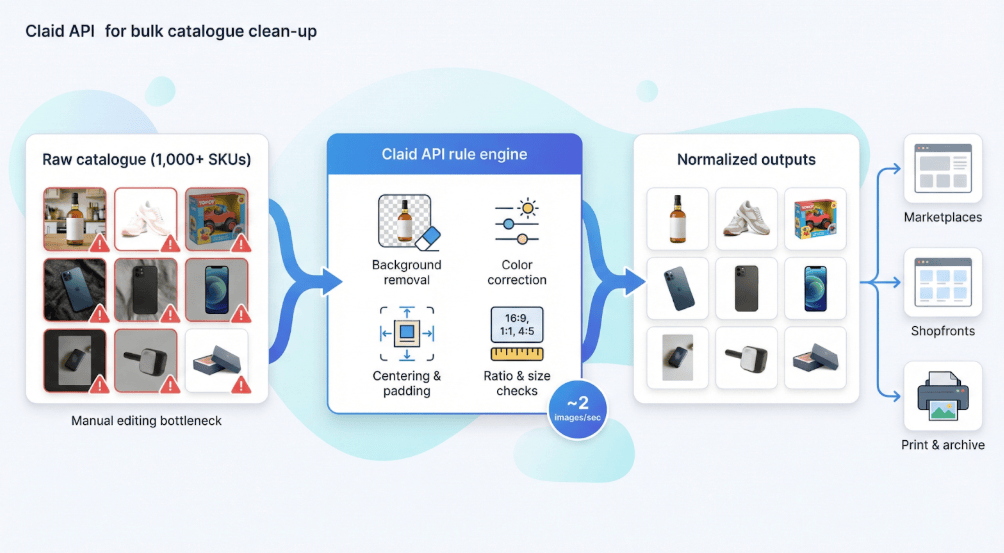
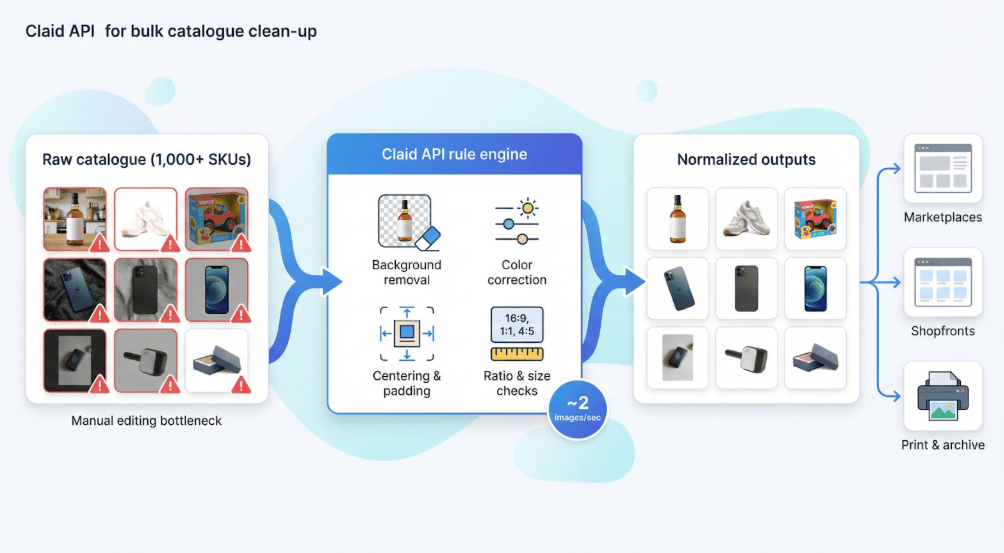
When a catalogue passes 1 000 SKUs, manual editing shifts from workflow to bottleneck. Claid.ai fixes that with an API that removes backgrounds, corrects colour, centres objects, and validates pixel ratios at up to two images per second on paid plans.
Rule engine precision. Marketplaces use Claid to enforce padding, aspect ratio, and file weight before listings go live, cutting image-rejection tickets by up to 70 percent, according to company case studies.
Volume economics. Claid prices in credits, not per-image dollars — its published plans are a free trial with 50 credits, Business and Enterprise (Claid, retrieved 2026-09-03, SOURCED). The "$0.02 per image" and "below $0.005" figures in an earlier version of this article do not appear anywhere on the vendor's pricing page and could not be verified, nor could the "two images per second" throughput or the "70 percent" reduction attributed to company case studies. That beats the cost of a single manual clipping path.
Flexibility. You can still apply branded colour profiles or AI-generated backdrops via reusable templates, so automation does not mean bland.
Trade-offs. Claid shows its full power only after a developer connects it to your DAM or PIM. Teams that need point-and-click ease may prefer Pebblely or Photoroom, but if scale demands automation, Claid delivers the horsepower.
How to choose the right tool for your store
Rankings help, but fit is personal. A solo Amazon seller tackles different challenges than a marketplace with 50 000 SKUs. Use the matrix below as a starting point, then review the four questions that follow.
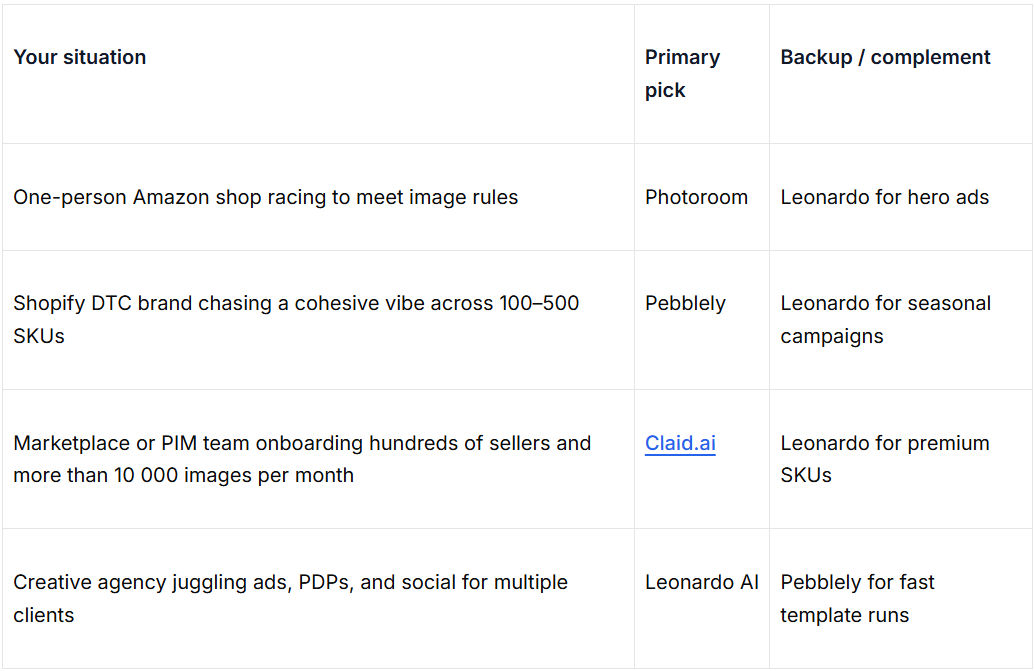
Think of the table as a compass, not a cage. Many teams blend tools: Claid for bulk cleanup, Leonardo for glossy lifestyle shots, or Pebblely for daily PDPs with Photoroom ready for mobile emergencies.
Before you decide, answer four questions:
-
How many new images will you publish each month? Volume determines whether token bundles or flat API pricing saves more.
-
Which channels matter today and tomorrow? Amazon requires white; Instagram craves colour. Choose software that adapts to both.
-
Who on the team will run it? Designers thrive in granular canvases, while founders prefer one-click presets.
-
How strict are your legal and disclosure needs? If exclusivity or AI labelling rules keep you up at night, favour platforms with clear IP ownership and transparency toggles.
Work through those prompts, and the right choice usually appears quickly.
2025–2026 trends shaping AI product imagery
AI product photo shoots go mainstream
Brands now treat prompt-driven shoots as a line-item expense, not an experiment. A widely repeated Gartner forecast puts AI-generated ecommerce imagery at 40 percent by 2026 — this article has never cited the source for it, and it could not be traced to a Gartner publication during review; treat it as unverified — and TechBullion profiles retailers replacing multi-day studio rentals with hour-long prompt sessions. The payoff is faster A/B testing and thousands of dollars saved per SKU. As AI becomes a staple in e-commerce workflows — not only for photography but also for text — tools that offer both visual and written automation become especially compelling, from generating hero images to writing entire product listings like LogicBalls’ “AI-generated product descriptions.
From flat images to 3D spins and AR try-ons
Shopify and Amazon both flag 360-degree sets as conversion boosters, with independent tests citing about a 30 percent lift when shoppers can rotate a product. Google’s AI try-on lets U.S. users view clothing and shoes on their own photos in real time, shrinking the gap between inspiration and checkout. Tools such as Leonardo already export depth maps, and Claid’s rule engine mass-optimises 360 tiles, so today’s 2D workflow can seed tomorrow’s interactive assets.
Regulation, transparency, and backlash
Compliance pressure is rising quickly. The EU AI Act’s Article 50 takes effect on 2 August 2026 and will require clear labelling of AI-generated product images. Spain has already approved fines of up to €35 million or seven percent of global revenue for unlabelled visuals. Consumer sentiment echoes regulators: Australian fashion label Atoir was criticised on TikTok for undisclosed AI models, prompting accusations of deceptive fit photography.
What this means for sellers
-
Budget: allocate GPU credits, not studio days.
-
Asset prep: capture depth or alpha layers now, and future-proof for 3D / AR.
-
Compliance: add a short “Image generated with AI” tag, keep source files, and remember that fines dwarf any short-term aesthetic gain.
Practical workflows and prompt playbooks
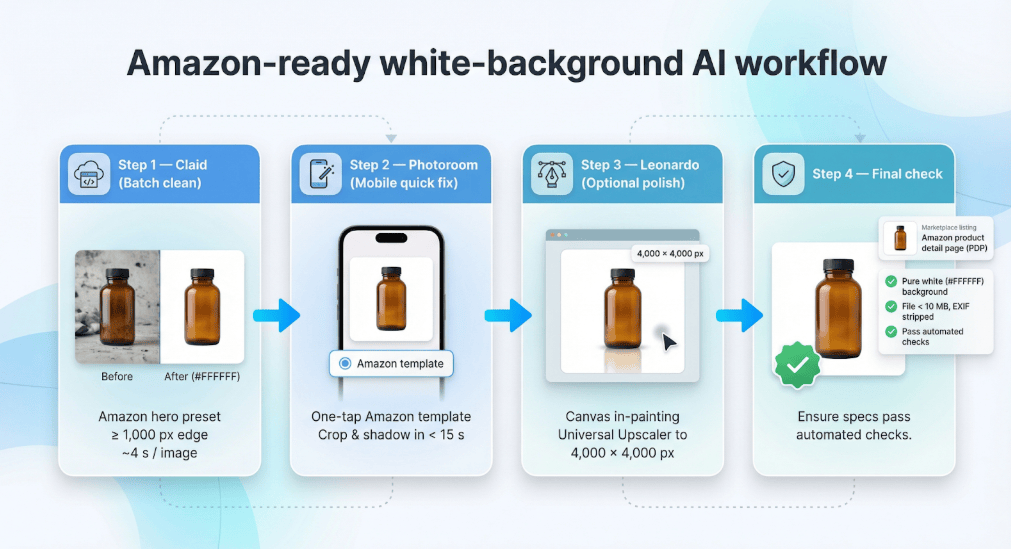
Amazon-ready white-background workflow
-
Batch clean in Claid. Choose the “Amazon hero” preset; the API applies a #FFFFFF background, centres the object, and delivers a JPEG of at least 1 000 px on the longest edge in about four seconds per image.
-
Mobile quick fix in Photoroom. For one-offs, tap “Amazon” in templates; the app handles crop and shadow in under fifteen seconds.
-
Optional polish in Leonardo. Use the Canvas in-painting brush to add a soft reflection, then run Universal Upscaler to 4 000 × 4 000 px for archival storage.
-
Final check. Strip EXIF data and keep file size under 10 MB to avoid Amazon rejects.
DTC beauty and skincare lifestyle workflow
-
Remove the background in Pebblely with the “transparent” option.
-
Apply a theme such as a blush marble countertop to maintain consistent lighting.
-
Add brand mood in Leonardo. Prompt PhotoReal V2 with cues like “diffused daylight, soft shadow,” and geometry stays locked to the original label.
-
Detail pass. In Canvas, sprinkle petals or droplets; lighting auto-matches the scene.
-
Export at 4 000 × 4 000 px, then compress to WebP for fast Shopify loads.
Bulk catalogue clean-up and refresh workflow
-
Normalise legacy shots in Claid. The API removes backgrounds, corrects exposure, and upscales images smaller than 1 000 px at about two images per second on Business tiers.
-
Apply brand style in Leonardo. Batch the cleaned assets into Canvas, and apply a saved preset, such as a soft grey backdrop with a 45-degree key light.
-
Route exports automatically. Claid delivers platform-specific folders: 1 000-px JPEG for Amazon, WebP for Shopify, and TIFF for print.
FAQs and common objections
Q. Can AI replace a human product photographer?
For speed and cost, yes. AI handles repeatable angles and bulk variants. Complex art direction, tricky textures such as jewellery or glass, and model poses still benefit from a human eye. The smart approach is AI for scale, people for nuance.
Q. Are AI-generated images allowed on Amazon?
Yes, if they meet the same specs as camera photos: a pure-white (#FFFFFF) background, at least 1 000 px on the longest edge, no watermarks, and an accurate depiction of the product. Amazon confirms that “digitally created images” pass as long as those rules hold.
Q. Do I need to label AI photos in the United States?
The FTC’s 2024 policy statement on generative AI warns that undisclosed synthetic imagery can be considered deceptive advertising. Best practice is to add a short “Image generated with AI” note in alt text or metadata.
Q. What are the penalties in Europe?
Under the EU AI Act, Article 50 takes effect 2 August 2026. Spain already authorises fines of up to €35 million or seven percent of global turnover for unlabelled images.
Q. Is one tool enough?
Often, yes: Photoroom for rapid Amazon compliance, Pebblely for on-brand Shopify shots, Claid for bulk automation, or Leonardo for full campaigns. Many teams still combine two tools to cover edge cases, for example, Claid API plus Leonardo for lifestyle edits.
Q. Should I wait for 3D and AR?
No. Create layered 2D assets now. Leonardo exports depth maps and transparent PNGs, and Claid can mass-optimise 360-degree tiles, future-proofing today’s images for tomorrow’s interactive formats.
Conclusion
These findings should help you select the AI photo generator that best fits your ecommerce workflow, volume, and creative ambitions.
How This Guide Was Sourced
Written and maintained by the LogicBalls editorial team (logicballs.com). Disclosure: LogicBalls builds AI writing tools. No vendor here paid for placement, and this article contains no affiliate or referral links.
AI involvement. This article was AI-assisted. Every price and capability claim was re-read at the vendor's own pricing page on 2026-09-03. Nothing was deleted: figures that proved wrong were corrected in place with the earlier value named, and figures that could not be confirmed are labelled where they stand.
The rankings rest on a test you cannot check. The stopwatch timings, the 100-point rubric and the per-tool scores were never published with an image set, prompt log, tool list or date range, and only four of the twelve tools claimed to have been tested are named. Those numbers are editorial impression. The prices below them are not — each is linked and dated.
Three vendor claims were wrong in ways that changed the ranking. Pebblely's pricing did not match its published plans on any point, including an "unlimited images" tier that does not exist. Photoroom was marked down for having "no API for catalogue automation" — it sells one, with its own documentation and SOC 2 certification, and that was the stated reason for ranking it below Claid on automation. Claid's per-image dollar rates appear nowhere on its site, which prices in credits.
Sources that could not be read: leonardo.ai returned HTTP 403 and 429 to every request, so
nothing in the Leonardo section is confirmed at source; Photoroom renders its prices in the browser,
leaving only a Teams figure in the page itself. The Gartner forecast quoted here has never carried a
citation in this article and could not be traced to a Gartner publication.
A link in this article previously pointed at a Norwegian municipal property company. An auto-linker turned the sentence fragment "saved per SKU. As AI becomes…" into a URL. It has been restored to plain text — worth knowing if you followed it.
No LogicBalls telemetry is used in this guide.
Related reading
Related Articles
 AI slide maker11 Best AI Presentation Generators & Slide Makers Tested (2027 Review)Discover the best AI presentation generators of 2027. Compare 11 tested tools for PowerPoint and Google Slides based on speed, exports, pricing, and features.Ankit Agarwal14 min read
 AI ToolsSound of Success: The Top AI Music Generators Transforming Business AudioDiscover the best AI music generators for business audio. Create royalty-free music for ads, videos, podcasts, and brand content faster.Mohit Singh11 min read
 AI clothes changer tools5 Online AI Tools Can Change Your Clothes 2026Discover 5 online tools that can change your clothes using AI. Try virtual outfits and styles with these clever digital wardrobe changers.Ankit Agarwal5 min read
 ecommerce9 AI Product Description Mistakes and What Each One Costs a SellerNine errors AI models put into product descriptions, each matched to the written rule it breaks: refund law, eBay policy, Google Merchant Center and the FTC.Ankit Agarwal11 min read